
Form DS 82: Sign Digital Passport eForm1.8.5 - Google Play
You'll be able to see results in few seconds.
Publisher Description


by PDFfiller.
This app contains the
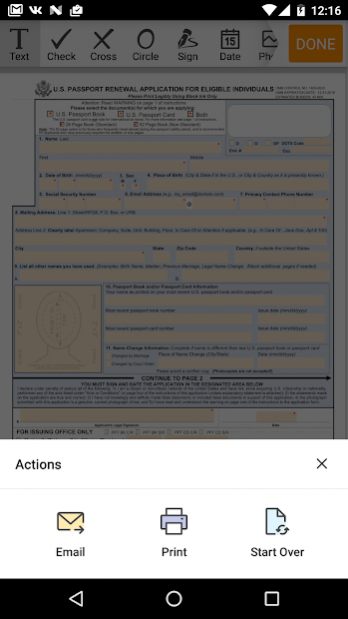
Passport Renewal Application document that you can fill out and sign
anytime and anyplace. You can download and open it from your mobile device whenever you need to.
By clicking Fill Now, the app will transfer you directly to the first page.
The passport form consists of six pages, three of which are fillable. Carefully read the first page to check if you are eligible to complete this blank DS-82. If at least one of your answers to the questions is No, then you're not eligible to complete this document. If all of your answers are Yes, tap on the respective checkboxes (otherwise you won’t be able to proceed).
If a fillable field in this section is marked with a red asterisk, it means you're required to fill it out.
Also, put a date on the top of the first page in the fillable date field.
The next three pages
represent legal information and details about the fillable DS-82
. After that, you pass on to the form itself.
Here, you have to enter the following data into the fillable fields:
✓ The type of passport you are applying for;
✓ Your personal data such as name, date of birth, SNN and contacts information;
✓ Full mailing address with ZIP code;
✓ Any other names you've had, if any;
✓ Your photo;
✓ Information from your most recent passport book or passport card;
✓ Indicate which data has changed, if any;
✓ Put your signature and add the date.
The next part of the PDF form DS-82 is for the issuing office where the following personal information should be included:
✓ Marriage details;
✓ Appearance description;
✓ Occupation;
✓ Permanent address;
✓ Plans for travel.
Before submitting your passport form, be sure to double check all the information that you've provided in order to make sure that you didn’t miss anything.
For your convenience,
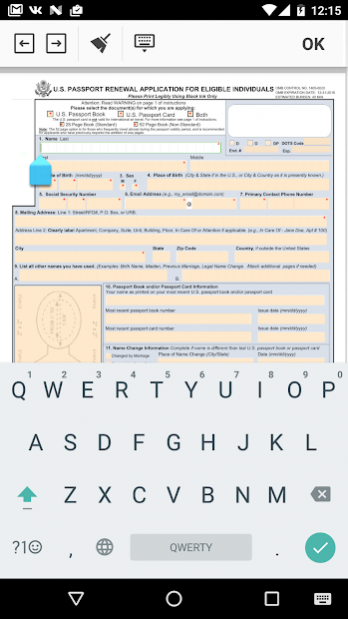
the application will guide you through each field with an easily-noticeable blue arrow
. You can also tap on the left and right arrows on the top of the screen. This will either move you a step back or forward. To make sure that you’ve completed everything, take advantage of the Wizard tool. It provides a comprehensive to-do list of all the fields in the file and indicates what specific kind of information should be entered in.
If you simply tap on the list item, the Wizard will take you to that particular field.
About Form DS 82: Sign Digital Passport eForm
The company that develops Form DS 82: Sign Digital Passport eForm is airSlate, Inc.. The latest version released by its developer is 1.8.5.
To install Form DS 82: Sign Digital Passport eForm on your Android device, just click the green Continue To App button above to start the installation process. The app is listed on our website since 2022-02-01 and was downloaded 0 times. We have already checked if the download link is safe, however for your own protection we recommend that you scan the downloaded app with your antivirus. Your antivirus may detect the Form DS 82: Sign Digital Passport eForm as malware as malware if the download link to com.pdffiller.singleform.DS82 is broken.
How to install Form DS 82: Sign Digital Passport eForm on your Android device:
- Click on the Continue To App button on our website. This will redirect you to Google Play.
- Once the Form DS 82: Sign Digital Passport eForm is shown in the Google Play listing of your Android device, you can start its download and installation. Tap on the Install button located below the search bar and to the right of the app icon.
- A pop-up window with the permissions required by Form DS 82: Sign Digital Passport eForm will be shown. Click on Accept to continue the process.
- Form DS 82: Sign Digital Passport eForm will be downloaded onto your device, displaying a progress. Once the download completes, the installation will start and you'll get a notification after the installation is finished.
Program Details
System requirements
Download information
Pricing
Version History
version 1.8.5
posted on 2022-02-01
- We've polished some rough edges for a smoother user experience.
version 1.7.13
posted on 2019-07-10
Performance and stability improvements
version 1.1
posted on 2016-12-14
Minor Bug Fixes and Performance Improvements.
Disclaimer
Official Google Play Link
We do not host Form DS 82: Sign Digital Passport eForm on our servers. We did not scan it for viruses, adware, spyware or other type of malware. This app is hosted by Google and passed their terms and conditions to be listed there. We recommend caution when installing it.
The Google Play link for Form DS 82: Sign Digital Passport eForm is provided to you by apps112.com without any warranties, representations or guarantees of any kind, so access it at your own risk.
If you have questions regarding this particular app contact the publisher directly. For questions about the functionalities of apps112.com contact us.
